Your first 14 days: how to get your regulars on the pass
Your first 14 days on Fideliya are a free trial with Pro features and no card asked. Aim for 20 customers on your pass: that is what the free plan holds, so reaching 20 in two weeks is the sign Pro will pay for itself. Day 1, print the QR for your till. Then offer it with every bill.
Day 1: print the QR for your till
Your counter does the asking for you. In your dashboard, press Download QR code or Print QR code. You find it on the Overview, on your pass’s page and on the screen you see the moment your pass is built.
You get a printable A4 sheet with your QR code, your logo and your reward line, written in your pass’s own language. Print one for each spot where people pay, and put it where every customer sees it while they wait:
- Café: by the till.
- Restaurant: on the bar or at the cash desk.
- Barber or hair salon: on the mirror at each chair.
- Gym: at the front desk.
- Bakery: by the bread counter.
A staff phone scans the customer’s pass at the counter: the visit is recorded and the pass on the customer’s phone shows it.
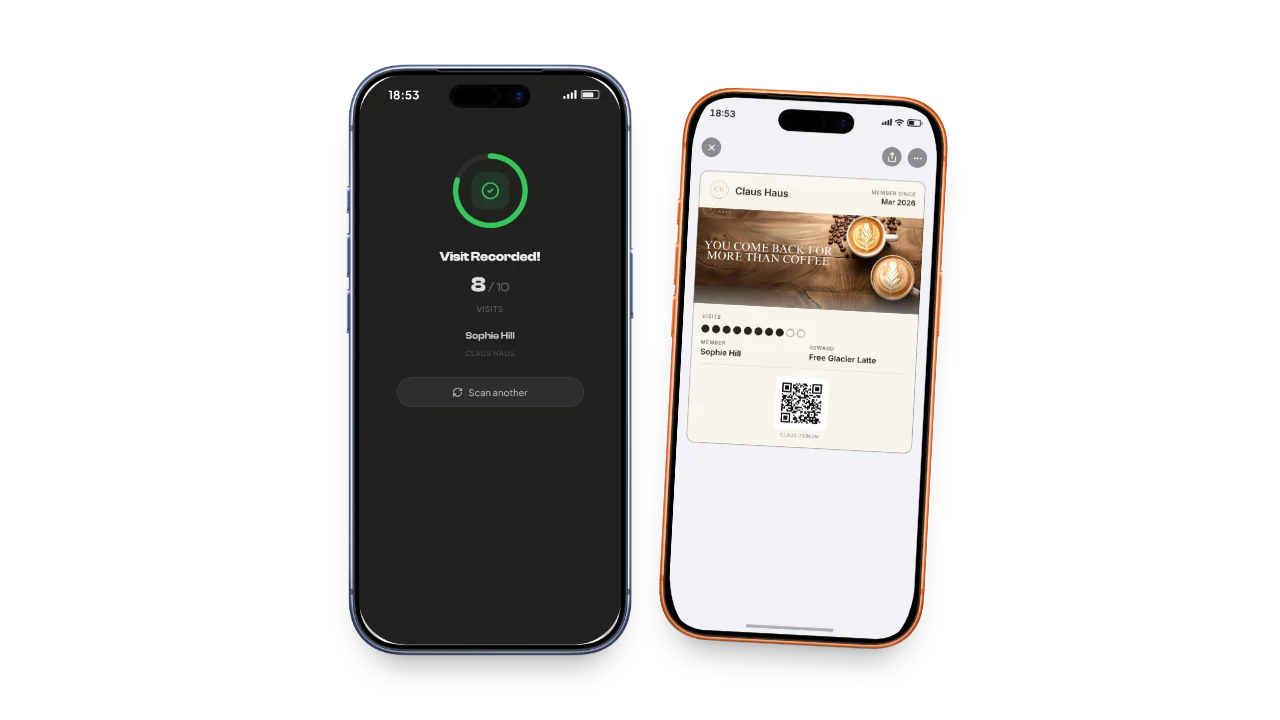
Day 1 at the counter: one line, one scan
Your team offers the pass with one short line at every payment. The customer points their phone’s camera at the QR, types their name and email, and adds the pass to Apple Wallet or Google Wallet. No app to download, no account or password to create.
When they come back, scan the pass with the phone you keep at the counter and tap Add a stamp: their pass moves one step closer to the reward. The scanner runs in the phone’s browser on every plan, and on Pro each of the five team seats has its own login.
Want the pass? One scan and it's done.
Days 2 to 7: offer it with every bill
Offer the pass to every customer, every day. The people who come most hear it most, and they are the regulars you want on your pass.
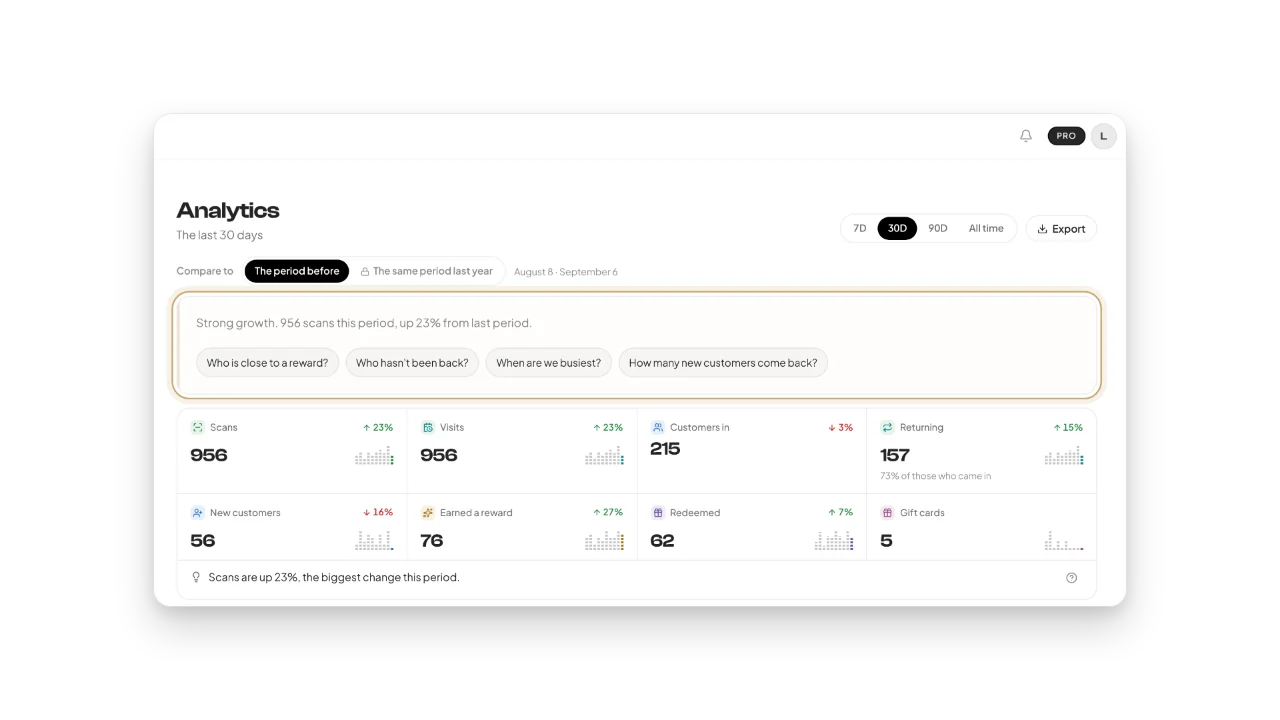
From the first scans, your dashboard fills in. The Overview shows your first customers. Your pass’s page shows who is collecting, who is closest to a reward and who has earned one you have not handed over yet. Analytics shows your visits over the last 7 days, on every plan.
One part of the Overview waits its turn: Due back. It lists the customers with no visit in over 30 days, so it fills in after your first month. From then on, one message reaches all of them.
The Fideliya dashboard shows who comes back, with the figures for the period the owner chooses.
Days 8 to 14: the first rewards, the first message
Your most loyal customers reach their reward. When a stamp completes a pass, the scanner says Pass complete. Tap Give, with your reward’s name on the button, and the pass starts again at 0. Tapped by mistake? Undo stays on screen for 5 seconds.
Then send your first message. One broadcast goes to everyone who holds your pass and lands on their lock screen: a new dish, a quiet afternoon, a thank you. You get one a month on Free and three on Pro.
Now picture 20 customers: twenty people who will walk past your counter again, each with your pass on their phone. Your dashboard shows you who they are.
Day 15: Pro or Free, your choice
On day 15 nothing is charged, because no card was asked. Your account settles on Free unless you choose Pro.
Nothing is deleted. Your pass and its design, your customers and their stamps all stay, and the pass in your customers’ wallets keeps working. So do the scanner and your rewards. What stops until you choose Pro: referrals, gift cards, the longer analytics, Fideliya AI and team seats.
Free holds 20 customers. If 20 joined in two weeks, your counter is ready for more: Pro, at €49.99 a month, holds 2,500 customers and four locations, with five team seats.
Your trade, your first 14 days
Where the QR goes, and the moment to offer the pass.
Coffee shops
By the till, where people wait for their order. Offer it as you take the payment.
Restaurants
On the bar or at the cash desk. Offer it with the bill.
Bakeries
By the bread counter. Offer it while you wrap the order.
Barber shops
On the mirror at each chair. Offer it before the cut ends.
Hair salons
On the mirror at each chair. Offer it while the colour sets.
Gyms
At the front desk. Offer it when members check in.
Questions owners ask
No. You start the 14 days with no card and no checkout, and there is nothing to cancel. On day 15 nothing is charged: your account settles on Free unless you choose Pro.
20, the same as the free plan. The trial gives you Pro features with Free’s caps: 20 customers and one location. Reach 20 in two weeks, and you know your counter needs Pro’s room for 2,500.
One line, at every payment: "Want the pass? One scan and it's done." The customer scans the QR on your counter and adds the pass to Apple Wallet or Google Wallet.
No. They scan the QR with their phone’s camera, type their name and email, and add the pass to Apple Wallet or Google Wallet. No app to download, no account or password to create.
No card was asked, so nothing is charged. Your account settles on Free unless you choose Pro. Nothing is deleted: your pass, your customers and their stamps stay, and the pass in their wallet keeps working.
Then you pay nothing: no card was asked, and the account settles on Free. Check two things first: the QR sheet sits where every customer pays, and your team says the line with every bill.
Yes, on Pro: up to five team members each sign in on their own phone and scan in the browser. On every plan, the scanner works on any phone with a camera, so the phone you keep at the counter can scan too.
In your second week, once your first customers hold the pass. One broadcast reaches everyone who holds your pass, on their lock screen. You get one a month on Free and three on Pro.
Your first 20 customers start at your till
14 days free. No card. If your regulars don't join, you pay nothing.