Connect your loyalty program to ChatGPT and Claude
Fideliya connects your loyalty program to ChatGPT and Claude through its MCP server at https://www.fideliyapass.com/mcp, included with the Pro and Enterprise plans. Add that address in your assistant, sign in to Fideliya, and ask in plain words how your week went or who is due back. The answers come from your own figures.
Ask the assistant you already use how your week went, and it answers with your own figures: visits, new customers, the regulars who came back and your busiest day. Ask who hasn't been in for a while, and you get their names, how many times they came and how long they have been away.
When the answer calls for action, ask for it. The assistant drafts the message to bring those customers back and shows you who it reaches. It goes out only when you tap Confirm.
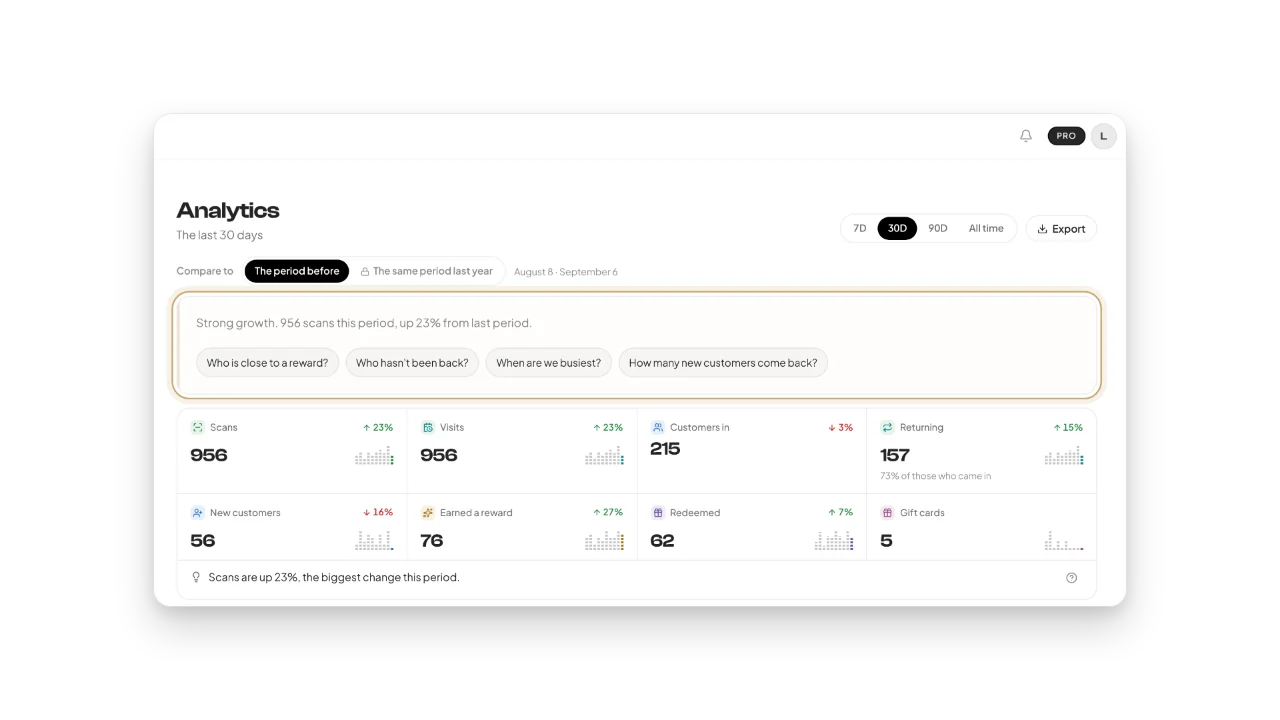
The Fideliya dashboard shows who comes back, with the figures for the period the owner chooses.
What you can ask
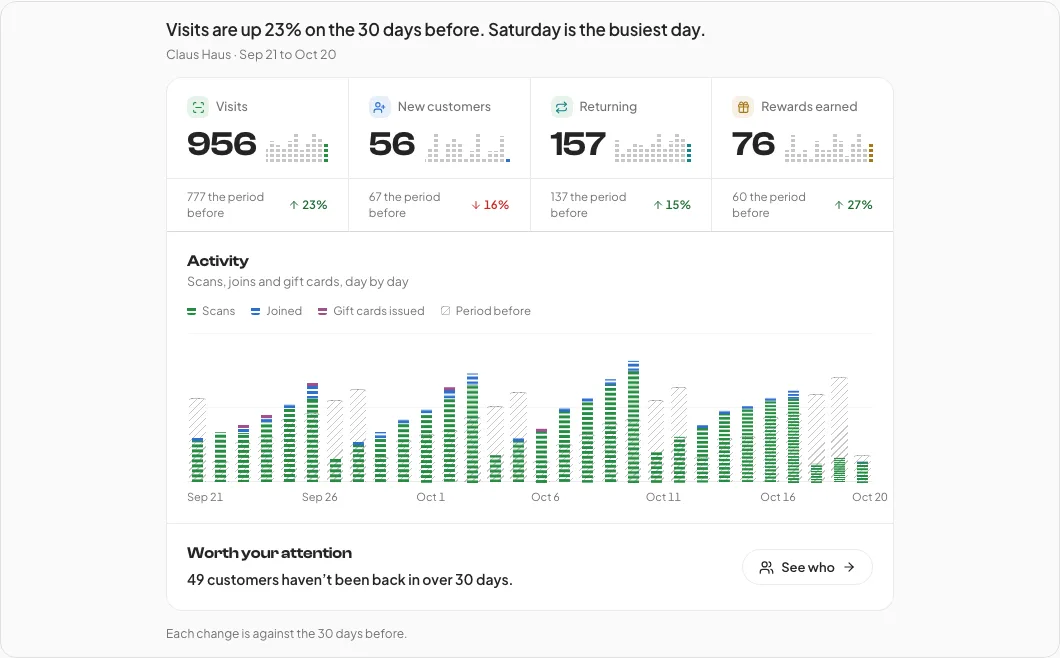
How did my shop do over the last 30 days?
Your visits, new customers, returning customers and rewards against the 30 days before, your busiest day, and how many customers have not been back in over 30 days.
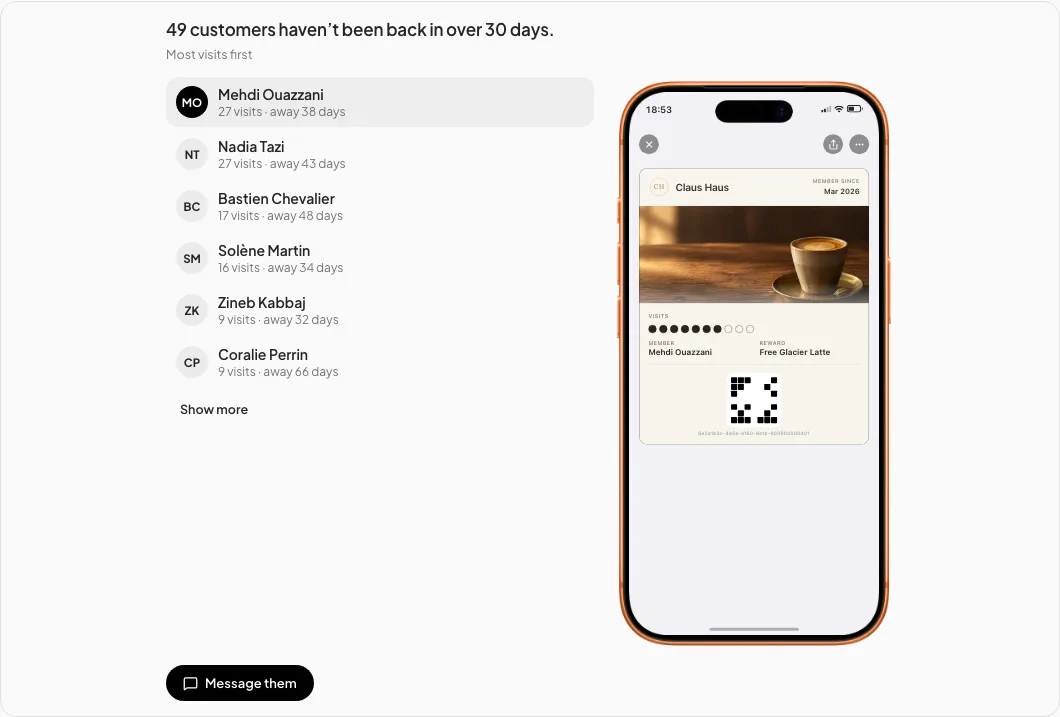
Which customers haven't been back in a while?
The regulars who stopped coming, most visits first, with how long each one has been away and the pass they hold.
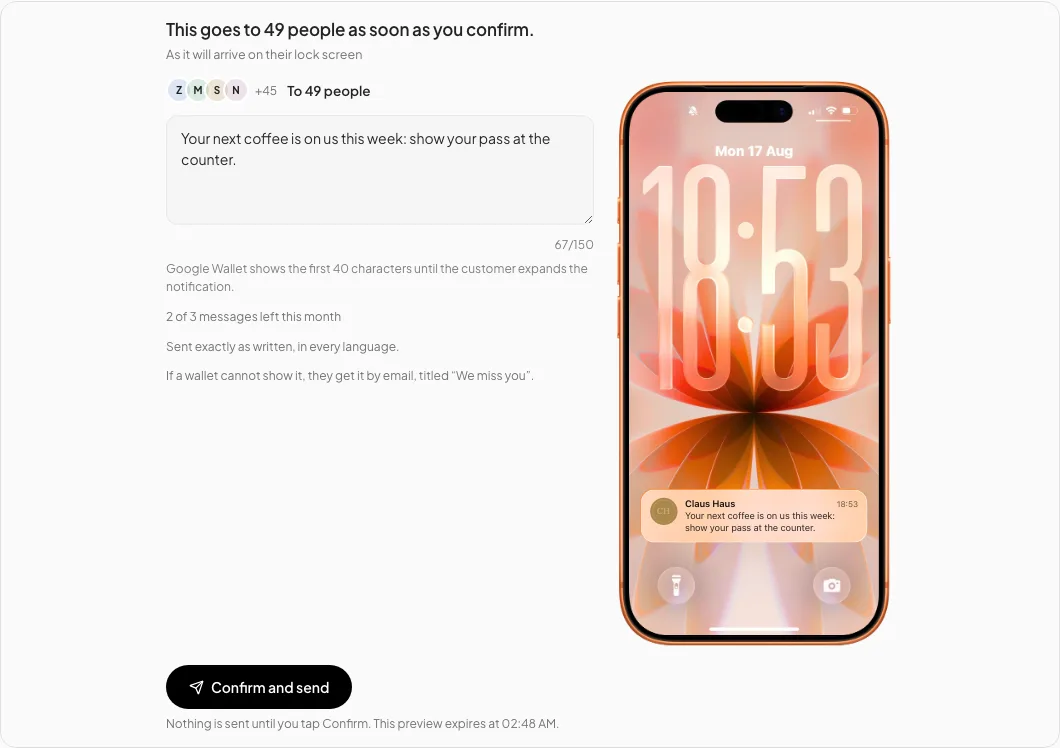
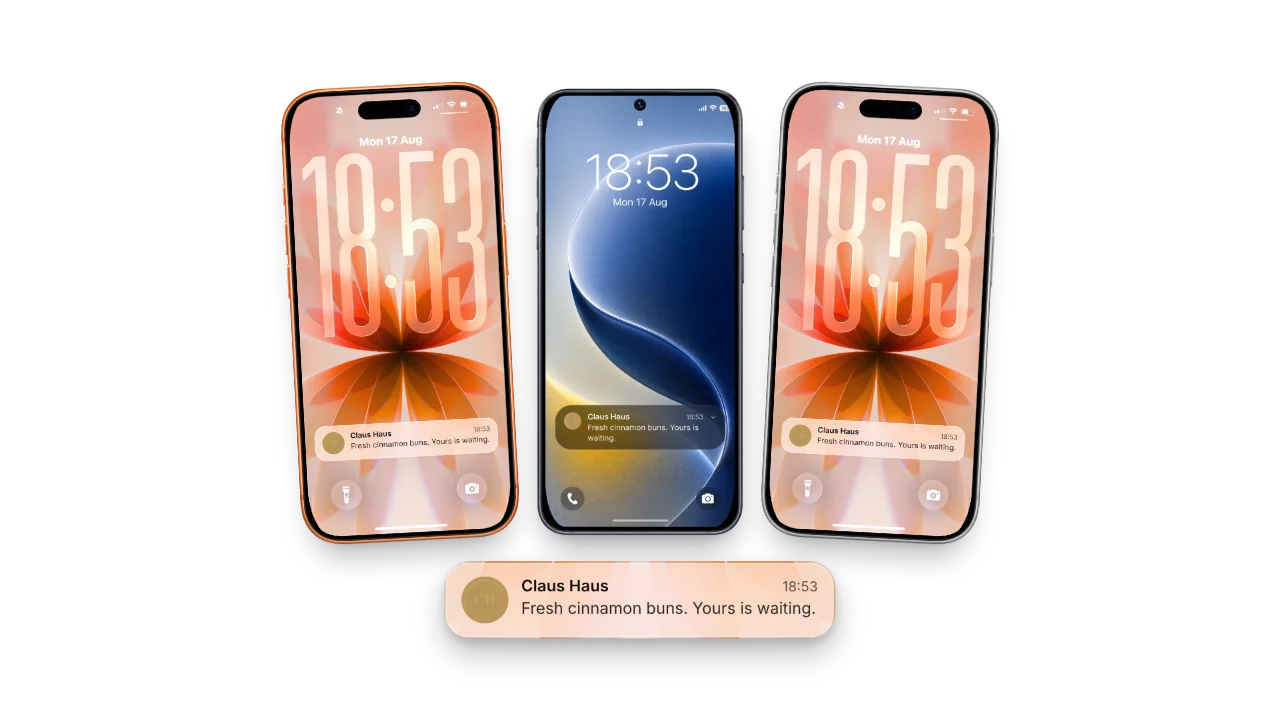
Tell the customers who haven't been back that their next coffee is on us this week.
With Full access, the drafted message, who it goes to and how it will look on their lock screen; it is sent only when you tap Confirm.
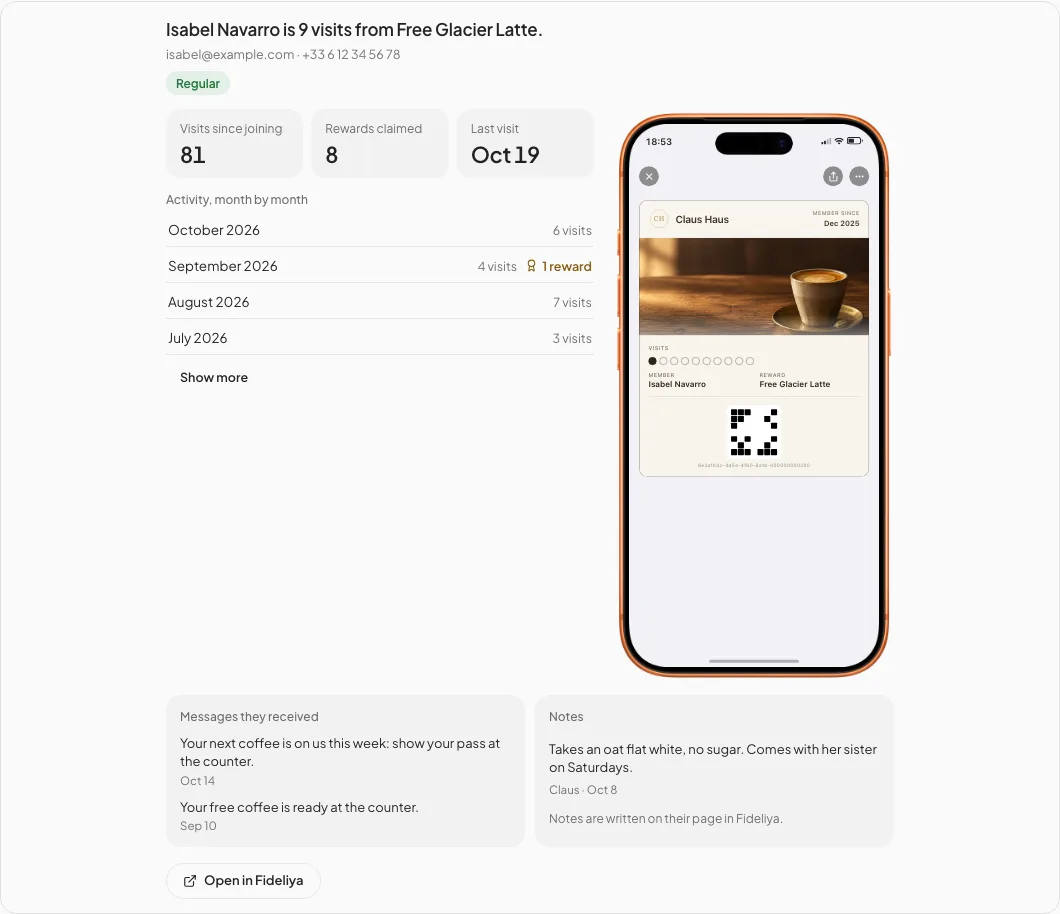
Show me Isabel Navarro's pass.
One customer at a glance: how far they are from the reward, visits since joining, rewards claimed, their last visit, month by month, the messages they received and your notes.
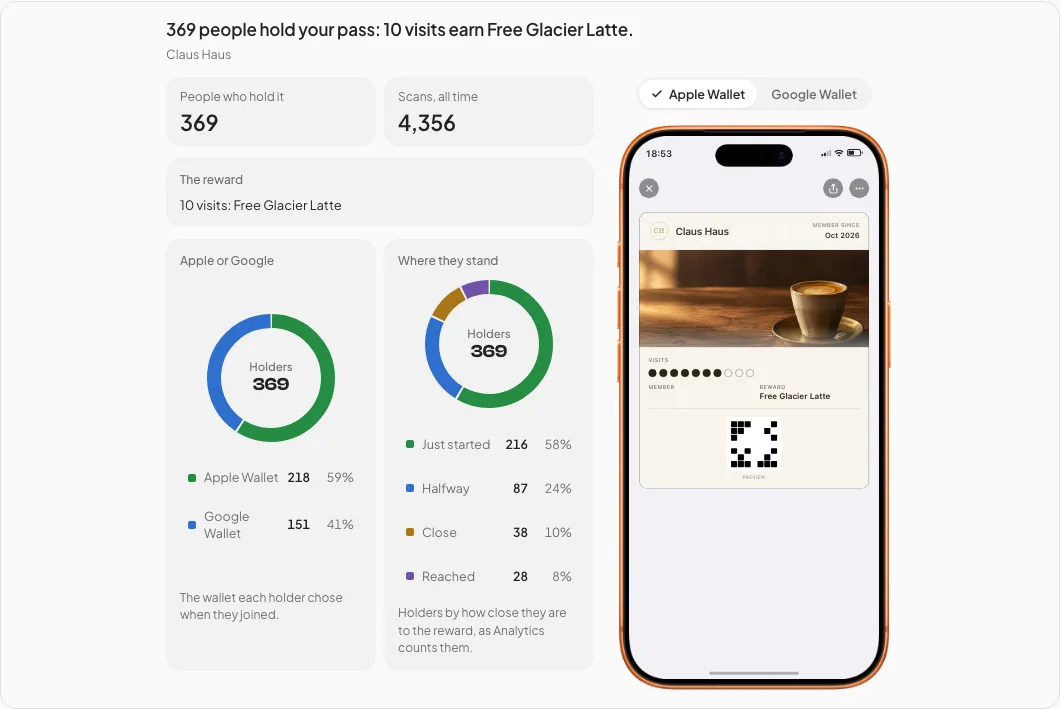
How is my loyalty pass doing?
How many people hold your pass, how many scans it has had, Apple Wallet against Google Wallet, and how close your holders are to the reward.
One message from the business lands on the lock screen of every customer who holds the pass.
Set it up in five minutes
You connect once, from the assistant you already use. These are the five steps; the exact clicks for Claude, ChatGPT and other agents are shown with them.
Be on Pro or Enterprise
The connector comes with Fideliya Pro and Enterprise. The 14-day trial includes Pro features, so you can connect it while you try Fideliya.
Add Fideliya’s address in your assistant
In Claude, add a custom connector; in ChatGPT, add a custom MCP server. Name it Fideliya and paste https://www.fideliyapass.com/mcp.
Sign in to Fideliya
Your assistant opens Fideliya’s sign-in page. Sign in with the account that owns the business.
Choose the business and what the assistant may do
One page follows: choose the business and the permission, then allow. Read only is the default: it reads your figures and customers and changes nothing. Read & write also enrolls customers and issues gift cards; Full access also prepares messages for you to confirm.
Ask your first question
Try "How did my shop do over the last 30 days?" The answer comes from your Fideliya account. We email you every time an assistant is connected.
How to connect
Pick your agent and follow its steps. You sign in to Fideliya once, then choose your business. The AI connector is included in the Pro and Enterprise plans.
Claude
- In Claude, open “Customize”, then “Connectors”, and choose “Add custom connector”.
- Name it Fideliya, paste the address below, and choose “Sign in now”.
- For the OAuth client, keep “Use Claude’s published identity”, then choose “Add” and “Connect” and sign in to Fideliya.
On a Team or Enterprise plan, an owner adds it once under “Organization settings”, then “Connectors”.
ChatGPT
- In ChatGPT, open “Plugins”, choose the plus button, then “Add custom MCP server”.
- Name it Fideliya and paste the address below under “Connection”.
- Choose OAuth to sign in, accept the warning, then choose “Create as a plugin” and sign in to Fideliya.
Not every ChatGPT plan can add its own MCP servers. ChatGPT’s help says which can.
Another agent
- In your agent, add a remote MCP server with the address below.
- Sign in to Fideliya when it asks, then choose your business.
Your agent needs to support MCP sign-in with a client ID metadata document. Agents that must register themselves first can’t connect yet.
https://www.fideliyapass.com/mcpWhat you’ll see next
- Fideliya’s sign-in page: sign in to your account.
- One page follows: choose the business, what the assistant may do (Read only unless you choose more), and allow. Change it, or disconnect it, any time in Settings.
- We email you every time an assistant is connected.
What it may do, and what it never does
- Read only: Reads your figures, your customers and their visits, your gift cards and referrals. Changes nothing.
- Read & write: Also enrols customers and issues gift cards. Cannot message your customers.
- Full access: Also prepares messages to your customers, each one confirmed by you before it goes.
- Whatever you choose, visits, points and rewards are added only when you scan the customer’s pass.
What stays locked
- An assistant never adds or removes a visit, a point or a reward. Those come only from scanning the customer’s pass at the counter.
- Nothing reaches your customers until you tap Confirm. You see the message and who it goes to first.
- It works on the one business you chose, with the permission you chose. Every assistant starts on Read only.
- Change the permission or disconnect the assistant any time in Settings.
Which plan you need
The connector is part of Fideliya Pro, at €49.99 a month, and Enterprise. Every new account starts with a 14-day trial that includes Pro features, so you can connect your assistant and ask your first questions before you pay anything.
Questions owners ask
Yes. Fideliya’s connector works in ChatGPT and in Claude: add https://www.fideliyapass.com/mcp in the assistant, sign in to Fideliya and choose your business. In ChatGPT, adding your own MCP server depends on your ChatGPT plan; ChatGPT’s help lists which plans can.
Yes, at https://www.fideliyapass.com/mcp. It is for owners on Pro and Enterprise, you sign in with your Fideliya account, and it lets your AI assistant read your figures, your customers and their visits, your gift cards and referrals.
No. Whatever permission you choose, visits, points and rewards are added only when you scan the customer’s pass at the counter. An assistant can read them; it never changes them.
Fideliya Pro, at €49.99 a month, or Enterprise. The 14-day trial includes Pro features, so you can connect an assistant while you try Fideliya.
On Read only, the default, it reads your figures, your customers and their visits, your gift cards and referrals, for the one business you chose, and changes nothing. We email you every time an assistant is connected, and you can disconnect it in Settings at any time.
Claude, including Claude Code, and ChatGPT, plus other AI agents that support MCP sign-in. This page shows the exact steps for each.
Your pass, ready in five minutes
14 days free. No card. If your regulars don't join, you pay nothing.